
To add covers:
- Select the frames you want to add covers to, or create and select a group containing those frames.
- Go to Automation (at the bottom of the scene objects panel).
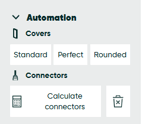
- Choose the type of cover you want to add.
- beCAD® will automatically add the covers to your selected frames.
Don’t forget to calculate the connecters again, to make sure that the cover clips are also calculate and included.